
I have a problem with scope creep in my personal projects. I set out to just test how the Home Assistant Voice control works before I go buying more expensive hardware, and I ended up with this instead:
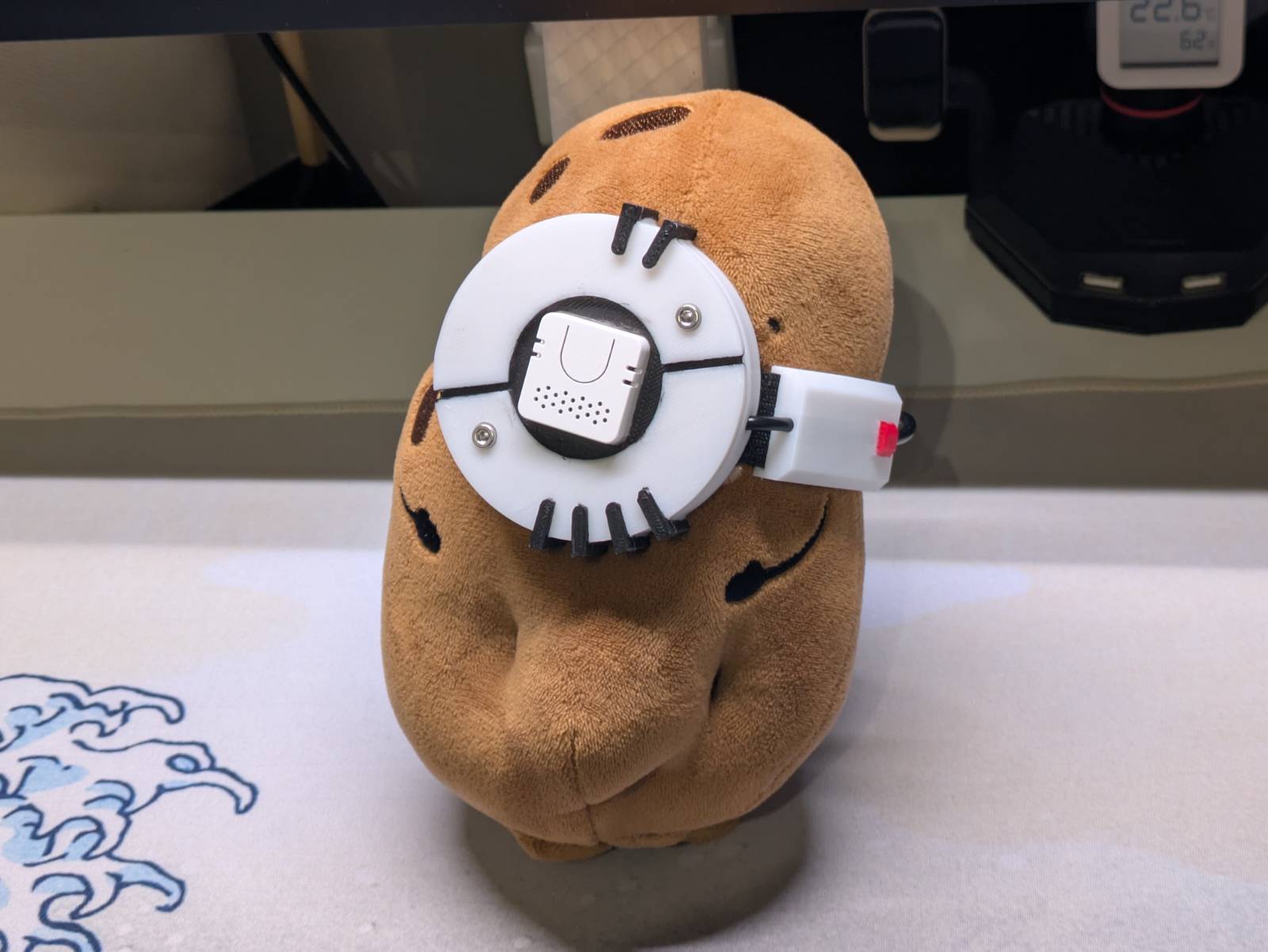
This is a smart speaker (though not a very good sounding one) in the form of GLaDOS, a character from the Portal video game series, in “her” potato form. It connects to my Home Assistant instance so I can control my smart-home appliances, or, being realistic, set up timers with my voice. If you’re interested in how I made it and how it works, and want to learn some “Polish lore” along the way, continue reading.
Why?
I have a Google Nest Mini speaker, which was gifted to me a while ago. I use it to drive a few smart bulbs I have, play some music, set up timers and make it ring my phone if I don’t know where I left it. The main issue with it, however, is that there’s a non-zero chance Google might be listening. …and since I’ve recently been trying to protect my privacy to at least some reasonable extent, it’s time to ditch it and have everything processed locally, on my RPi CM4-based server.
Voice satellite
There exists the Home Assistant Voice Preview Edition,
a Plug & Pray™ voice satellite made specifically for HA. The thing is, it costs nearly as much as I
paid for my CM4 module, and at the time I didn’t know if my server would be capable of running
the “voice stack” anyway.
I found out you can make a Home Assistant voice satellite for a fraction of the price, with the M5 Atom Echo. It’s basically an ESP32 with a built-in microphone and speaker, and it cost me 65zł (~$17). I spun up a few containers, configured HA, did some tests and I was impressed by how little you need to make this all work.
Screw it, I’m making GLaDOS
You know how some random experiences or impressions make ideas “click”? This is exactly that kind of chain…
As you might imagine, the sound coming out of such a tiny speaker is distorted. The voice
I initially settled on in piper settings (more on that later) was “SAM”, which, flat and muffled,
sounded kinda like GLaDOS falling down the elevator shaft in
the Portal 2 game. That single thought made me realize:
- The whole stack is running on a Raspberry Pi, which is basically a potato among computers.
- I live in Poland, where for some reason we turn potatoes into mascots.
Hmm…
Allright fellas, we doin it
Cosplaying Mr. Ziemowit as GLaDOS
Here’s a quick lesson in “Polish lore” for you.
We have this chain of stores named “Biedronka” (eng. Ladybug), which is the biggest (by revenue) chain of “mostly-grocery” stores in Poland. Every year, they come back with this brand-loyalty type promotion, where every X złoty spent earns you a sticker, and if you collect a certain number of stickers you can get a free plushie. Each edition additionally increases the “bar of absurdity” by making the plushies more bizarre. Examples of the ones I myself used to have:
- a roll of toilet paper plushie
- a slice of bread plushie
- a wiener plushie
You think I’m joking, but in fact I am not.

If you wanna learn what other things they turned into cursed plushies, just google any of these:
Gang Świeżaków, Gang Słodziaków, Gang Fajniaków, Gang Swojaków, Gang Bystrzaków, Gang Mocniaków, Gang Produkciaków, Gang Biedroniaków, Gang Zaradniaków
The point is, in one edition there was a “Ziemniak Ziemowit” (Ziemowit the potato, it’s actually in the gif above), which is an ideal GLaDOS body material. All I needed to do was hunt one down on OLX.
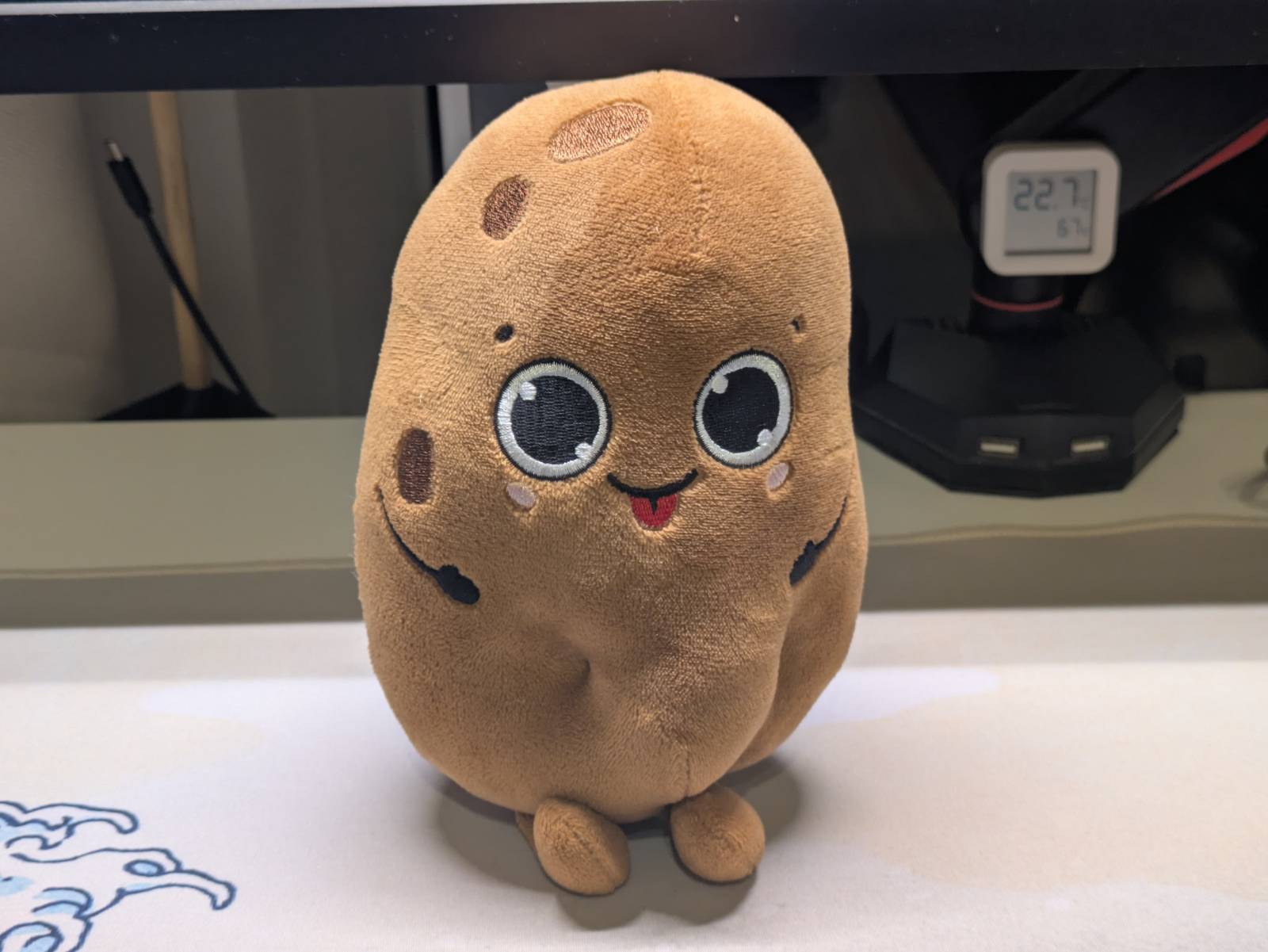
7zł + postage later (and a round in the washing machine) I had acquired the cursed potato plushie.
Cosplay
The next thing on the “TO DO” list was creating a cosplay for the plushie that would turn it into the potato GLaDOS. Since I don’t have any skills at sewing, I went with the non-destructive approach, meaning the whole GLaDOS kit had to be a separate detachable piece. This means I had to simplify it quite a bit, and get rid of the nails and the wires ending in alligator clips that Valve’s design had. My aim was never to make a perfect copy, but rather:
- imagine what V2 could have looked like if it was in the game,
- make sure that if people see it, they would recognize “potato GLaDOS” in it.
I came up with something like this.
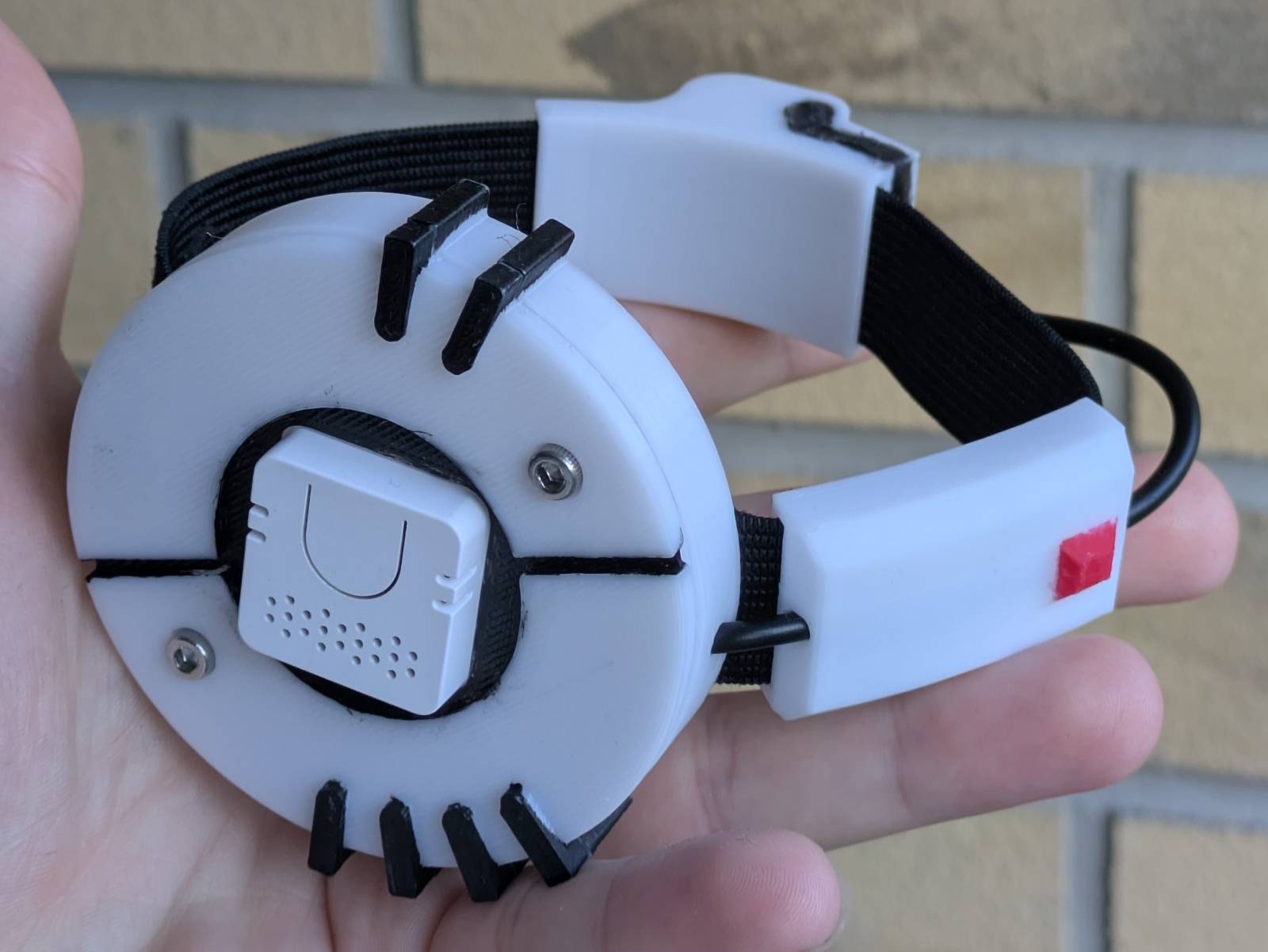
Here are a few design choices I made:
- I’ve put the Atom Echo in the center to mimic the “core” the original design had,
- I’ve kept the asymmetric line that visually splits the two halves,
- I’ve replaced the red LED on the core with 2 M3 screws. These are functional and sandwich the two parts together, as inside there’s a spring that holds the Echo in place,
- I turned the wires the core had into radiator-like fins,
- I kept the core-submodule and made it a cable guide.
Functionally, all this design does is relocate the USB-C port from the Atom Echo to the back of the body and add a mounting hole so it can be placed on a 10mm rod. All the components mount on a 20mm wide elastic band I bought on Amazon.
Since my 3D-printer only does single-color prints, I just printed it in white and painted the details with acrylic paint using a small brush. I’d say the result is good enough, though someone more skilled (and with more patience) would probably do a much better job than me.
Model’s on Thingiverse
As with any other design I do, this one is also free to download on Thingiverse from this link:
https://www.thingiverse.com/thing:7418839
You can do whatever you want with it, all I ask for is attribution.
Home Assistant integration
All you need to know regarding enabling voice control in Home Assistant is condensed into these two instructions:
Here I will only cover the quirks and my own experiences.
Spinning up containers
The main operating system on my CM4 based server is OpenMediaVault, and I am simply running Home Assistant in the official Docker container. The limitation of this setup is that add-ons cannot be installed directly in HA, and instead I had to spin up additional containers “by hand”.
To make our GLaDOS hear and speak, I needed containers with TEXT-TO-SPEECH and SPEECH-TO-TEXT engines. For speech, the recommended engine is piper, and for speech-to-text you can use:
- speech-to-phrase - (closed-ended), which is lightning fast even on the Pi, but is limited to only a subset of Assist’s voice commands.
- whisper - (open-ended), which transcribes everything, but is unusably slow on the Pi (I’ll come back to this later).
I settled on the following compose file:
services:
  piper:
    image: rhasspy/wyoming-piper:latest
    container_name: wyoming-piper
    restart: unless-stopped
    ports:
      - "10200:10200"
    volumes:
      - "CHANGE_TO_COMPOSE_DATA_PATH/wyoming/piper:/data"
      - "/etc/localtime:/etc/localtime:ro"
    environment:
      - TZ=Europe/Warsaw
    command: --voice en_US-sam-medium

  speech-to-phrase:
    image: rhasspy/wyoming-speech-to-phrase:latest
    container_name: wyoming-speech-to-phrase
    restart: unless-stopped
    ports:
      - "10300:10300"
    volumes:
      - "CHANGE_TO_COMPOSE_DATA_PATH/wyoming/speech-to-phrase/models:/models"
      - "CHANGE_TO_COMPOSE_DATA_PATH/wyoming/speech-to-phrase/train:/train"
      - "/etc/localtime:/etc/localtime:ro"
    environment:
      - TZ=Europe/Warsaw
    # HA is host-networked, so it isn't reachable by container name.
    extra_hosts:
      - "host.docker.internal:host-gateway"
    # Retrains on start (~1-2 min on a CM4) to pick up newly exposed entities.
    command: >
      --hass-websocket-uri ws://host.docker.internal:8123/api/websocket
      --hass-token ${HASS_TOKEN:?set HASS_TOKEN in the stack environment}
      --retrain-on-start
Once the services were up and running all that was left to do was adding the Wyoming Protocol
integration in HA.
Making it sound like GLaDOS
At this point I had everything up and running, I used SAM as the default voice, and this is when
I had a flash of genius as described in the “Screw it, I’m making GLaDOS”
section. The potato form was nice, but to make it a true GLaDOS I would need 3 additional things:
- Make it sound like GLaDOS
- Make it a true “AI”
- Make it react to “GLaDOS”
The first part turned out to be much simpler than I anticipated, because someone
(rokeya71 or dnhkng) has
already bothered making
the GLaDOS VITS model
for Piper. All that needs to be done is downloading the .onnx.json and .onnx files into the piper
data directory.
B=https://huggingface.co/rokeya71/VITS-Piper-GlaDOS-en-onnx/resolve/main
curl -fL "$B/glados.onnx"      -o glados.onnx
curl -fL "$B/glados.onnx.json" -o glados.onnx.json
…then in the HA it’s a matter of reloading the piper integration and setting up the GLaDOS voice in the Assist pipeline.
Note: While it isn’t stated anywhere, the audio files from the game might have been used to create the voice model. The source audio is Valve’s copyrighted work, and it is the result of Ellen McLain’s voice acting and the work of sound engineers. I leave the decision whether it is right to use such a model to your own morality.
Not a true AI
I thought making my potato GLaDOS AI powered would be the cherry on top of this project, and sadly I failed, but not for the reasons you might think.
As previously stated, the CM4 is a potato on its own and I had to work around that if I wanted to make everything local. First I investigated tiny home-automation models like Needle 3 by Cactus Compute and home-llm models by acon96. The first one is a fresh solution and would require a lotta hackjobs to play with HA nicely, and I didn’t want to maintain those. The second one I got deployed successfully, but quickly realized the limitation of such models, which is that they are not “chat” models. They just output the JSON HA can take, but ask them about the weather and they get confused.
Home Assistant gives you a setting to forward the task to AI only if it can’t be handled by the
internal pipeline. …and so my next plan was to spin up a small chat-type model I could use to talk
with GLaDOS (more for a demo than actual work), and let HA pipelines do the automation. The model
I settled on was SmolLM2:360M, simply because
it was small and created sentences that made sense. I spun up an ollama container, loaded the model
up, and I was getting ~4.5–5 tok/s (which is near reading speed), so not half bad on the Pi.
What ended up biting me instead were 3 things:
- I needed to change from
speech-to-phrasetowhisperto use the full vocabulary. On the Pi this is unbearably slow (the HA page says 8s to process, and I can confirm that), to the point it is unusable. - HA had issues differentiating what should be handled by the internal pipeline and what should be passed to AI. Simple commands like “set a timer” were improperly passed to SmolLM, which spat out gibberish.
- There were issues with the model in that after a few exchanges it fixated on giving the same answer. While I bet people who self-host LLMs would know what was wrong right away, I’m still new to this and due to the two issues above I wasn’t really keen on figuring out what was wrong.
The whisper speed has really put me off and unfortunately it’s not something I can reliably
work around. Therefore, my GLaDOS is sadly just a pattern recognition algorithm.
Hey GLaDOS
Wake words are the short phrases that make assistants wake up and listen. You probably know “Hey Google” or “Hey Siri”. By default you get to choose from 3 wake words, but you might as well train your own wake command, like “Hey GLaDOS”. I planned to do this initially, but I lost interest when I couldn’t get the AI pipeline to work. Yet, I’ve learned some things while planning this, and if you decide to push this project further, they might be interesting to you.
First of all, someone has bothered to make the wake word for “Hey GLaDOS”. Here’s a link to the PR that adds it. …so if it truly works, you can skip the training part.
Secondly, the Atom Echo has a beefier successor in the form of Atom VoiceS3R. This matters as supposedly the on-device micro wake word is kinda stretching the original Atom Echo’s capabilities, and non-fine-tuned models might run flaky on it. If you wanna have a go at it, consider using the newer board. The obvious downside, however, is that it is blue.
Demo
Alright, so I guess I owe you some kind of demo, where GLaDOS says “the line”. Here’s a YouTube short I made:
This was a triumph
That’s it ladies and gentlemen. One more project crossed out from my never-ending “TO DO” list. The GLaDOS assistant potato edition is up and working and holds a spot on my desk. I will test it for a while and eventually decide if I need better hardware.
If you want to print the GLaDOS cosplay kit yourself, the link to the 3D models is here:
https://www.thingiverse.com/thing:7418839
…along with the instructions on how to assemble it.